In this guest post Jeff Chandler reviews the TellaFriend Widget.
 In the ever increasing socialness of the web, everything from news to photos to videos are being shared. Outside of ShareThis, I’m not to familiar with other sites or services that are exclusively centered around sharing items across the web. During the past week, I was tipped off to a new service that has launched called Tell A Friend. Tell A Friend is a widget that is displayed on a page that enables visitors to essentially, tell a friend about a particular item.
Company Info:
Tell A Friend was created by SocialTwist. SocialTwist is a company that specializes in building widgets to the point where they almost become applications. Tell A Friend is the first widget application from the company with Widget Applications soon to be developed for internal corporate use. The company has two offices, one in the U.S. (Sunnyvale, CA) and India ( Begumpet Hyderabad, AP)
The Signup Process:
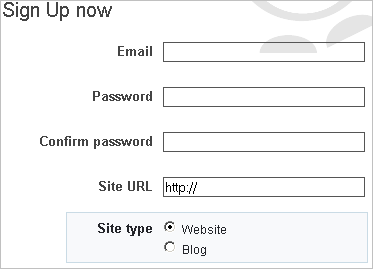
In order to use the widget, you’ll have to sign up first. The sign up process contains the typical email and password fields with an additional field to configure your Site URL and then confirm whether you operate a website or a blog. The difference between the two is that if you choose the blog option, you’ll be able to select from a list of popular blogging platforms to make installation of the widget easier. For this review, I selected blog and from the dropdown menu, I selected the WordPress Engine Plugin.
After signing up, you’ll be sent an activation email. Once you agree to their terms of service, you’ll be able to login to the site.
Using Tell A Friend:
Once logged in, you’ll gain access to your Widget Code which is the same thing as your account id number. Installation instructions for using the widget with TypePad, WordPress, Blogger, and Textpattern can also be found in this location. If you’re using a self installed version of WordPress, download and install the Tell A Friend plugin. I can’t link to the plugin because it is dynamically generated with your user account ID number. Once the plugin is activated on your blog, the widget will automatically be placed at the end of your content. For example:

Configuring The Widget:
If you’re worried about the Widget not blending in with your blog design, don’t be. Tell A Friend provides options to change the widgets design. You can even configure the design of the button to be a large, small, or medium sized graphic. There is sure to be an option that looks good with your design.

When configuring the widget, you’ll come across something called Channels. These channels are labeled as email, IM, blog, and social. When a visitor hovers their mouse cursor over one of these particular channels on the widget, a row of services will popup enabling visitors to share a particular piece of content with their friends which of course is the basis behind the entire service. If you’re looking for even more customization, you can customize the message that is displayed when someone shares content through a particular channel.

Keeping tabs on who is using the widget is made simple since Tell A Friend provides a usage stats page that is tied to your account. The stats showcase channel usage, widget views, widget uses, and more.
Conclusion:
All in all, Tell A Friend enables exactly that. The ability for visitors to tell their friends about something cool they’ve found. However, it is difficult for me to recommend using this widget versus something like ShareThis which is established and performs exactly the same functions as Tell A Friend. However, competition is a good thing and if ShareThis doesn’t suit your fancy, Tell A Friend makes a nice alternative.


Its a cool widget and I’ve already seen it on some blogs. However, I wonder whether most users will switch from ShareThis to Tell a Friend. It does seem to happy nice features though.
I have been using the Tell A Friend Widget and the Share Widget on my blog and website for a few months now. I highly recommend using them. It’s easy and better than hand coding it yourself.
Yet another social networking tool? The widget seems fine, but nothing revolutionary as you also noted. It appears the social networking tool niche could use a little consolidation. Between all the ‘subscribe to this and share that’ widgets which now clutter too much of many blog pages( I’m guilty as well), there is hardly room for posts.
I have sharethis on my website. while this looks like a nice tool, i see no need for both and i think most people are already accustomed to sharethis.
Nice plugin! I think im gonna install it now!
Thanks for sharing this! I do not use any script like this on my blog but I think I will consider this in the hope that it will send real traffic my way. Thanks again for sharing this. OkeTimothy, Affiliate Marketer
I recently switched from ShareThis to Tell A Friend, mainly because the ShareThis widget kept showing up under my stripe ad, which was quite annoying.
I kinda like the Tell A Friend widget, but there’s one major downside; there aren’t any social bookmarking sites you can add to it. I get stumbled massively once in a while, but this could be more if it’d be easier to add it to StumbleUpon (or Digg, or Delicious for that matter).
If they add it soon enough, it could be a killer widget.
Interesting, there will always be new products and services to review and discuss. I’m sure new social sites and services are popping up everyday. The question is, which one of these services will work for you, and which one is a waste of time? Thanks for sharing. :)
I was checking out my own blog and as part of my redesign, I don’t use any sharing services any more. It has gotten to the point where I think if my content is going to be stumbled or submitted to digg or what have you, that particular user will know how to do it and will most likely have the tools to do it anyways. So, that is one less thing on the blog.
Check out my Word of Mouth Marketing Plugin that includes TellAFriend: http://daverigotti.com/wordpress-word-of-mouth-marketing-plugin
I understand the need to have continual widgets on your blog. But can’t something like this be taken care of with a simple ‘tell a friend’ java script.
I guess it is for the technically challenged, but really do we need a widget for everything?
Has anyone found that they get more traffic by using this tell a friend widget? I would be curious to see if is more powerful than just a simple tell a friend java script
Doesn’t sound much different than the ShareThis button I already have on my blog.
Personally, if I really want to share something with a friend I use Share on Facebook 99% of the time.
I’ve implemented it on my blog and you just gave me an idea to make a blog post about it to let people know what it does.
Seems a lot like shareThis.
Really cool widget. Will surely try it out!
Thanks for posting!
Perfect timing for a new blogger like me. I’m going to try it straight away. Thanks!
I’m new to blogging so I’m definetly going to give this a shot to drive traffic to my site. Thanks for the info!
It’s a great widget! I added it to my blog.
I keep meaning to implement this on my blogs i just gotta find the time.
Well, when I started my blog 4 month ago, I wanted to add a widget like that in my website….so I’ve searched and tried almost every plugin/widget available for wordpress…then I found ‘Tell a friend’….I’ve been using it since September and I’m very happy with the simplicity and with the usefull features…..
Check out the plugin working here – http://www.alcidesfialho.eu
Thanks for the post! I ended up going with “Share This” but both are great tools. Makes me sad I can’t use the widget on my music homepage, since it’s a flash template and I don’t have a way to add code to it…but yay for blogs!
Thanks so much, I love reading your blog, I am only new to all of this but I always get so much out of what you say on here, thanks heaps :))
Pretty neat widget. I like it a lot. I want to go a play with it now. This might be cooler than sharethis…
It’s a pretty cool widget, which I’ve used on my site with some success. It doesn’t take up much real estate, and gives your readers another way to share your content. All in all I like it!
Matt
Hi Mr. Darren. I love reading your blogs. I’ve read your book PROBLOGGER and I am inspired to do so. I started blogging a month ago but I still don’t know of how to popularize it.
You can also visit mine : http://mariancalago.blogspot.com
Nice and attractive plugin…
Great widget! Added to my Blog :)
I tried it on my blog. On the first day, the widget was used 2 times using Twitter and Yahoo emails.
After a few days though, the usage hasn’t been so great anymore. I think I’ll probably switch to ShareThis plug-in
hmm great widget I would say this one will succeed Share this.Share this is a bit popular than this one.Lets see what the condition of Share this after this comes into lime light
I for one I appreciate the options, I think having a new widget on a blog may be a nice change of pace, seeing the same usual widgets over and over on all the same blogs can have the same effect like banners where people just look past them and become immune.
I am appreciate the useful information, I will check more deep and evaluate the tool above …..thanks
The only problem with this widget is that you can add only a single site. What about those who have (let’s say) 50 sites? Will they have to signup with all their sites? No, thanks.
I recommend AddThis widget. It will do the job ;)
I tried to add Tell A Friend to my TypePad blog and it requires that I use the advanced template/upgrade my service. Why couldn’t it just work like all the other widgets?
I like the concept because Tell A Friend is so much more of a user friendly idea than share this – seems like more people (especially newer web users) would perceive it as easier to use.
I guess I’ll keep it for later . . .
I agree with Alex – I have two blogs and would want to use it on both.
@Alex, @Tim,
Thanks for your comments. We will certainly bring about a way to add multiple blog under the same account. You would see Bookmarks tab by end of month.
i signed up for it and haven’t looked at the repot. Thanks for bringing this up so that I can see what it has done for me…..i’ll let you know
thanks for posting. just install it on my blogger blog and it’s work, meaning: so easy to install this widget.
and great to know that Socializer will add function for telling a friend about multiple blog post.
thank you.
i actually have already know this tools, some commenter told me this tools but i never using it, now i know whats the benefit of it, Thanks a lot for telling this!
I’m new to the blogosphere, so I always appreciate learning about new things and new tools that I can potentially use to help me out.
Thanks!
Tell-a-Friend adds Social Bookmarks support and becomes the single button for both one-to-one personal messaging and through social sites and blogs. Now Tell-a-Friend can be an effective replacement for any other sharing button you may already have on your site/blog.